The capacitor is one of the smallest components inside a ceiling fan and also one of the most consequential. When everything is working correctly you never think about it — the fan starts smoothly, runs at the speed you selected, and reverses direction without complaint. But when the capacitor begins to fail, the symptoms can be puzzling enough that many homeowners assume the entire motor is done and start shopping for a replacement fan. In most cases that is the wrong call. A failed capacitor is a straightforward and inexpensive repair, and understanding what the capacitor actually does makes it much easier to recognize when it is the source of your problem and what to do about it.
What a Ceiling Fan Capacitor Actually Does
Most ceiling fans are built around a motor design called a permanent split capacitor motor, which is a variation of the standard AC induction motor that has been refined specifically for low-speed, continuous-duty applications like ceiling fans. This motor design uses two separate coils of wire wound inside the motor housing — one called the start winding and one called the run winding. Under normal operating conditions both windings carry current simultaneously, but they need to be out of phase with each other in order for the motor to produce rotation rather than just sitting there vibrating and humming. The capacitor is what creates that phase difference.
By connecting the capacitor in series with one of the windings, it introduces a shift in the timing of the current flowing through that winding relative to the other. This phase displacement is what produces the rotating magnetic field that the motor needs to generate torque and spin the blade assembly. Without the capacitor — or with a capacitor that has degraded to the point where it can no longer maintain the correct phase relationship — the motor loses its ability to start reliably, run at consistent speeds, or in some cases operate at all.
Speed control adds another layer of complexity to how capacitors function in ceiling fans. Some fans use tapped windings to achieve different speeds, varying the number of turns of wire that are actively carrying current at each speed setting. Others regulate speed by switching different capacitor values into the circuit, which changes the phase shift and the resulting torque output. Fans that use the capacitor-switching method will often have a multi-value capacitor — a single component with multiple internal sections and more than two wires — handling all of the speed regulation work. This design is common and perfectly reliable when the capacitor is in good condition, but it does mean that a single failed capacitor can knock out multiple speed settings simultaneously.
How to Tell If Your Capacitor Has Failed
The symptoms of a failing ceiling fan capacitor are fairly consistent across different fan brands and models, which makes diagnosis reasonably straightforward once you know what to look for. The most common presentation is a fan that runs noticeably slowly on all speed settings regardless of which speed you select — as if the high speed setting now produces what used to be low speed, and low speed barely moves at all. This happens because the reduced capacitance can no longer maintain the phase relationship the motor needs to reach its rated speed, so the motor runs at a fraction of its designed output.
Another very telling symptom is a fan that will not start on its own but will spin freely and run if you give the blades a manual push to get them moving. This happens because the capacitor provides the initial phase difference that allows the motor to develop starting torque. Without it, the motor can sustain rotation once it is already moving — since the run winding alone is enough to keep a spinning rotor going — but it cannot produce the torque needed to start from a standstill on its own. If your fan sits still and hums when you turn it on but spins normally once you push a blade, a failed capacitor is almost certainly your problem.
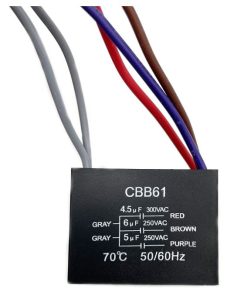
Speed-specific failures are also a strong indicator. If certain speed settings simply do not work — for instance the fan runs on high and medium but produces nothing on low, or low and medium work but high is dead — and the speed selector switch itself tests fine, one section of a multi-value capacitor has likely failed while the other sections remain functional. Visible damage to the capacitor itself is the most definitive sign of all. The capacitor in a ceiling fan is typically a small black rectangular or cylindrical component located inside the switch housing or canopy, and if it shows signs of bulging, burning, melting, or any kind of physical distortion, it needs to be replaced regardless of whether the fan is still running.
Finding the Right Replacement Capacitor
This is where many people run into trouble, not because finding a replacement is difficult, but because they are unsure how to match the replacement to the original. The key specification is capacitance, which is measured in microfarads and abbreviated as uf or µF on the capacitor body. A two-wire capacitor has a single capacitance value — something like 4uf or 5uf — and replacement is simply a matter of finding a capacitor with the same value and a voltage rating at or above the original. The voltage rating on a ceiling fan capacitor will typically be 250V or 400V for AC applications, and going higher than the original rating is perfectly acceptable. Going lower is not.
Multi-wire capacitors are more involved but still straightforward once you understand what you are looking at. A three-wire capacitor marked as 7uf+2.5uf is simply two capacitors sharing a common wire and a single casing — one 7 microfarad section and one 2.5 microfarad section. A four-wire or five-wire capacitor may have three or more individual sections inside, and there is usually a small wiring diagram printed on the side of the capacitor body that maps which wire corresponds to which section. The replacement needs to match the original wire count and the capacitance values of each section. If you cannot find an exact match, a variance of plus or minus one microfarad from the original value is generally acceptable and will not cause any meaningful change in fan performance.
Before purchasing a replacement, check with the fan manufacturer first. Many brands stock exact replacement capacitors for their models, which eliminates any guesswork about specifications. Failing that, the capacitor values are always printed directly on the original component, so reading them off before you order is straightforward. Replacement ceiling fan capacitors are widely available online and generally cost well under twenty dollars for standard residential fan applications. Electrical supply houses, hardware stores, and HVAC parts suppliers are also good sources, particularly for older fans that used oil-filled metal canister capacitors rather than the modern film-type components. Those older oil-filled capacitors can be replaced with equivalent modern capacitors of the same value — the physical form factor will be different but the electrical function is identical.
How to Replace a Ceiling Fan Capacitor
Capacitor replacement is one of the more accessible ceiling fan repairs because it involves no mechanical disassembly of the motor itself — you are working entirely within the switch housing or canopy where the wiring connections are made. Start by turning off the circuit breaker that controls the fan and confirming with a non-contact voltage tester that power is genuinely off before touching any wiring. This is not optional. Capacitors store electrical charge and can deliver a shock even after power is disconnected, so allow a few minutes after cutting power before handling the component directly.
With the switch housing open and the capacitor located, take a clear photograph of the existing wiring before disconnecting anything. This photo is your reference if you have any uncertainty about which wire connects where when you install the replacement. Capacitor wires in ceiling fans connect via spade terminals or wire nuts, and the connections pull apart or unscrew cleanly without any special tools. Once the old capacitor is free, compare it against your replacement to confirm the wire count and values match, then connect the new capacitor using the same configuration as the original. Tuck the new capacitor into the housing, reassemble the switch housing or canopy, restore power, and test all speed settings to confirm normal operation has been restored.
The video below walks through the complete process of identifying and replacing a ceiling fan capacitor, which is particularly helpful if you are doing this for the first time and want to see the steps demonstrated rather than just described.
A Note on Older Oil-Filled Capacitors
Fans manufactured before the mid-1980s frequently used oil-filled capacitors rather than the dry film capacitors that are standard in modern fans. These older components are large metal cylinders, often mounted inside the motor housing rather than in the switch housing, and they have a distinctly industrial appearance compared to the compact black boxes found in contemporary fans. If your older fan needs a capacitor replacement and you find one of these components, do not be discouraged. Oil-filled capacitors of the correct values are still available from electrical supply houses and motor repair shops, and modern dry film capacitors of equivalent values can be used as direct electrical replacements even though the physical size and mounting may differ. The electrical characteristics are what matter, and a properly matched modern capacitor will perform identically to the original oil-filled unit it replaces.
Related Ceiling Fan Repair Help
If replacing the capacitor does not resolve your fan’s symptoms, the problem may lie elsewhere in the control system. Our ceiling fan troubleshooting guide covers a broader range of motor and control issues, and our pull chain replacement guide addresses speed selector switch failures that can produce similar symptoms to a bad capacitor. For fans with remote control systems, the remote control troubleshooting page covers receiver and transmitter issues that can cause speed and responsiveness problems that are sometimes mistaken for capacitor failure.